I wanted a wall panel for Home Assistant: a few lights, a few switches, and the thermostat, on a screen big enough to hit without looking. The board I landed on is a Guition JC8012P4A1C, sold on AliExpress for about $67. It’s a 10.1-inch, 800×1280 capacitive touchscreen in a case, driven by an ESP32-P4 with an ESP32-C6 alongside for WiFi.
There’s no Linux on it, so no kiosk browser pointed at a Lovelace dashboard. The P4 is a microcontroller. That makes it an ESPHome job, with LVGL drawing the UI and the native Home Assistant API carrying state both ways.
The config is on GitHub: andylittle/lcd-touchscreen.
Which board do you actually have
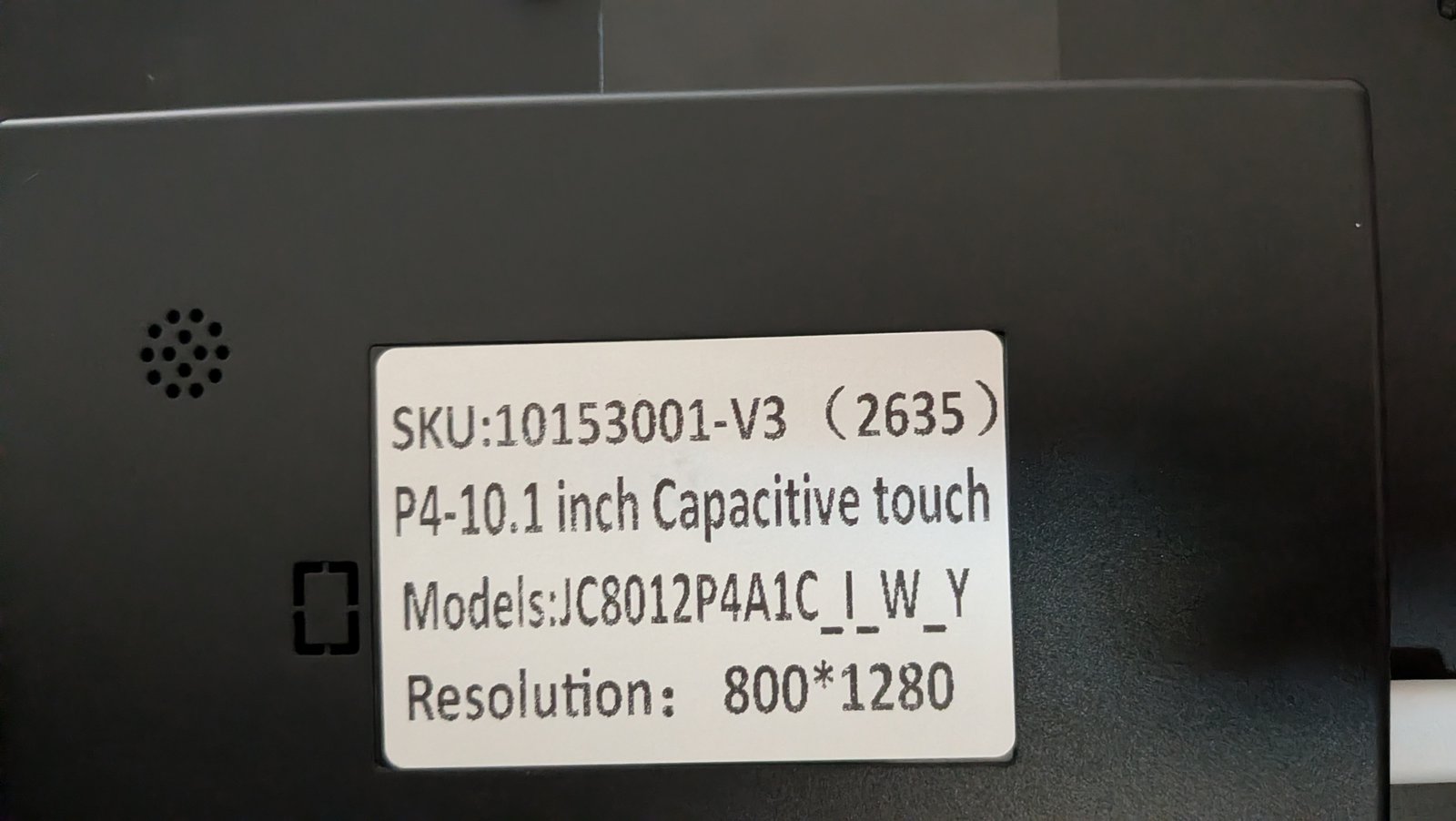
The rear label matters more than it should. Guition has shipped at least three variants under the same model name:
- Batch below 2624: the original display panel. ESPHome’s
mipi_dsimodel isJC8012P4A1. - Batch 2624 and later: a new display panel with a different init
sequence. The model is
JC8012P4A1-V2. - The newest boards also moved to production ESP32-P4 silicon, revision v3.x, which needs different firmware than the earlier engineering samples.
Mine says 10153001-V3 (2635). esptool reported ESP32-P4 (revision v3.2).
So it’s the V2 panel on v3 silicon, which in ESPHome means
engineering_sample: false. Most community configs I found still had true,
from the older boards.
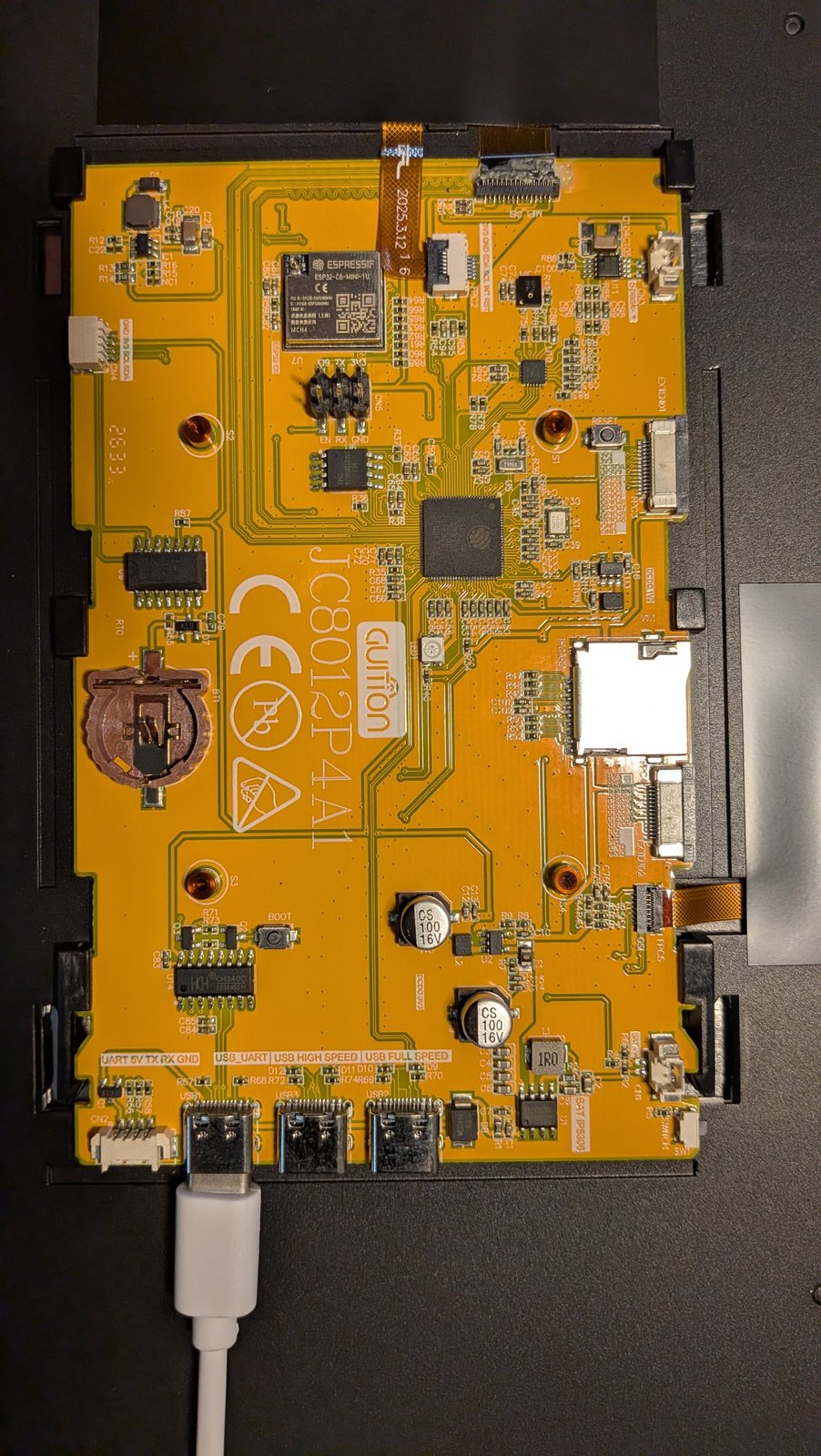
With the back off: three USB-C ports along the bottom. The left one, marked
USB_UART, goes through a CH340 to the P4’s UART0. That’s the one to flash
and read logs through. It shows up as /dev/ttyUSB0, not ttyACM0, and
ESPHome needs logger: hardware_uart: UART0 or you only see the ROM boot
text. The C6 WiFi module sits near the top. The C6 talks to the P4 over SDIO:
esp32_hosted:
  variant: esp32c6
  reset_pin: GPIO54
  cmd_pin: GPIO19
  clk_pin: GPIO18
  d0_pin: GPIO14
  d1_pin: GPIO15
  d2_pin: GPIO16
  d3_pin: GPIO17
  active_high: true
ESPHome needs Python 3.12
ESPHome 2026.7 and later require Python 3.12. Debian 12 ships 3.11, so
pip install esphome found nothing newer than 2026.6. PEP 668 blocks
pip install --user on Debian too. What worked was bootstrapping
uv in a throwaway venv and letting it fetch
an interpreter:
python3 -m venv /tmp/uvboot && /tmp/uvboot/bin/pip install uv
/tmp/uvboot/bin/uv venv --python 3.12 .venv
/tmp/uvboot/bin/uv pip install --python .venv/bin/python "esphome>=2026.9.0,<2026.10"
A venv hard-codes its own absolute path, so moving the project folder later
broke it with cannot execute: required file not found. Recreating it fixed
that. ESPHome’s build cache in .esphome/ also remembered the old path, and
the upload went looking for a firmware.factory.bin in a directory that no
longer existed. Deleting .esphome/ and rebuilding fixed that one.
Boot loop number one: the display clock
The first flash booted, initialized touch, and died:
[C][component:164]: Setup touch
abort() was called at PC 0x48046255 on core 1
Rebooting...
addr2line against the ELF put it inside ESP-IDF, called from ESPHome’s
display setup:
_mipi_dsi_ll_set_phy_pllref_clock_source at hal/esp32p4/include/hal/mipi_dsi_ll.h:218
esp_lcd_new_dsi_bus at esp_lcd/dsi/esp_lcd_mipi_dsi_bus.c:61
esphome::mipi_dsi::MipiDsi::setup() at mipi_dsi.cpp:40
That function is a switch over clock sources that ends in abort(). On P4
v3 silicon, IDF compiles a different version of it with a different set of
valid sources. ESPHome 2026.9.0 passes MIPI_DSI_PHY_CLK_SRC_DEFAULT, which on
IDF 5.5 is defined as the legacy source from the pre-v3 chips. The rev 3
switch has no case for it, so the default branch aborts.
ESPHome had already fixed this upstream in #18984 on September 5, by passing 0 and letting IDF pick. It just missed the 2026.9.0 release. The workaround is to vendor the component with that one line changed:
esp_lcd_dsi_bus_config_t bus_config = {
    .bus_id = 0,
    .num_data_lanes = this->lanes_,
    // 0 lets ESP-IDF pick the right default for the chip revision.
    .phy_clk_src = (mipi_dsi_phy_clock_source_t) 0,
    .lane_bit_rate_mbps = this->lane_bit_rate_,
};
external_components:
  - source:
      type: local
      path: components
    components: [mipi_dsi]
Once ESPHome 2026.10 ships, the folder can go.
The dashboard
The layout is one landscape page. Four light cards: tap to toggle, drag the slider for brightness. Four switch cards. A full-width thermostat card with the current temperature, the setpoint with +/− buttons, and heat, cool, auto and off modes.
Every Home Assistant entity is a substitution at the top of panel.yaml, so
pointing a card at a different light is a one-line change:
substitutions:
  light_1: light.living_room_lamp_one
  light_1_name: LR Lamp One
  climate_main: climate.downstairs
State flows both ways. A homeassistant binary sensor mirrors each entity into
the panel and updates the card’s checked state, so the card follows changes made
anywhere else:
binary_sensor:
  - platform: homeassistant
    id: st_light_1
    entity_id: ${light_1}
    on_state:
      - lvgl.widget.update:
          id: btn_light_1
          state:
            checked: !lambda return x;
A tap calls the action back:
on_click:
  - homeassistant.action:
      action: light.toggle
      data:
        entity_id: ${light_1}
That last part does nothing until you allow it. In Home Assistant, open the ESPHome integration entry for the device and turn on Allow the device to perform Home Assistant actions. It’s off by default. The panel happily shows state without it and silently ignores every tap.
The touchscreen that wouldn’t start
With the display fixed, the screen showed the dashboard, and Home Assistant changes showed up on it within a second. Touching it did nothing.
The touch controller is a Silead GSL3680, and it’s an odd part. It has no
flash of its own. On every boot the host uploads about 4,500 register writes
of firmware to it over I2C, starts it, and then checks a marker: register
0xB0 should read 5A 5A 5A 5A once the firmware is running. Mine read zeros:
[D][touchscreen.gsl3680]: Read configuration #2: 12, 34, 56, 0
[D][touchscreen.gsl3680]: Load firmware complete
[D][touchscreen.gsl3680]: Read RAM: 0, 0, 0, 0
[E][touchscreen.gsl3680]: Unexpected byte in read_ram: got 0x0, expected 0x5a
The chip was answering. It echoed a test write back correctly and accepted the whole upload without an I2C error. The firmware just never ran.
I went through everything I could find that differed from a working setup:
- ESPHome’s built-in
gsl3670driver, which loads a firmware table meant for a Seeed board. No touches. - The community
gsl3680driver from the original ESPHome thread for this board, and espcontrol’s fork of it. Same zeros. - The firmware table from Guition’s own demo code, which differs from the one in the community driver. Same.
- The stock init order: a second reset and start after the upload, polling the marker ten times, touch initialized after the display. Same.
- 100 kHz I2C, and the backlight held off during touch init. Same.
- espcontrol’s prebuilt V3 firmware, flashed as-is. Same failure, in their build too.
The breakthrough was a boot log from the stock Guition firmware, which another owner had attached to an espcontrol issue about these exact batch-2635 boards. Same chip revision, same sequence, and their chip came up:
I (3646) gsl3680: load fw success
I (3756) gsl3680: gsl3680 startup_chip failed read 0xb0 = 5a,5a,5a,5a
(The message says “failed” either way. The values are what count.) Another owner in the same thread had touch working with the espcontrol build that failed for me. Same firmware, same batch, different result. That pointed away from software.
The panel was plugged into a USB-C port on my laptop dock. I moved the cable to a port on the laptop itself:
[D][touchscreen.gsl3680]: Read RAM (attempt 1/10): 5a, 5a, 5a, 5a
[I][touchscreen.gsl3680]: GSL3680 firmware running
First try. The 10-inch backlight, the P4, and the C6’s radio were drawing more than the dock port supplied, and the touch controller was the one thing that failed. The display, WiFi and the Home Assistant connection all looked perfectly healthy the whole time, which is what sent me looking at software. I kept the backlight-off-until-boot change anyway, since it lowers the peak draw while the touch firmware starts.
One tap, two toggles
Touch now worked, and the Home Assistant logbook showed a new problem:
18:17:17  light.living_room_lamp_two  on   light.toggle
18:17:17  light.living_room_lamp_two  off  light.toggle
The GSL3680 sometimes reports a single tap as two presses a few milliseconds apart, at almost the same coordinates. Each one fired a toggle. Every card action now goes through a small guard:
// The GSL3680 sometimes reports one finger tap as two presses a few ms apart,
// which made toggle buttons flip twice. Ignore taps within 400 ms of the last.
inline bool tap_allowed() {
  static uint32_t last = 0;
  uint32_t now = esphome::millis();
  if (now - last < 400) return false;
  last = now;
  return true;
}
on_click:
  - if:
      condition:
        lambda: 'return tap_allowed();'
      then:
        - homeassistant.action:
            action: light.toggle
            data:
              entity_id: ${light_1}
A longer touch_timeout of 150 ms on the touchscreen helped too. After that,
22 presses gave clean single toggles.
Gotchas, collected
- Read the rear label first. Batch 2624 and later needs
JC8012P4A1-V2. Production v3 silicon needsengineering_sample: false. - Flash through the port marked USB_UART. It’s
/dev/ttyUSB0, and logs needlogger: hardware_uart: UART0. - ESPHome 2026.9.0 boot-loops on P4 v3. Vendor
mipi_dsiwithphy_clk_srcset to 0 until 2026.10. - Power it properly. A weak USB port leaves the touch controller dead while
everything else looks fine. If
0xB0reads zeros, try the power before you try another driver. - Allow Home Assistant actions on the ESPHome integration entry, or taps are ignored.
- Debounce taps. The GSL3680 can split one tap into two presses.
- Recreate the venv and clear
.esphome/after moving the project. Both remember absolute paths.
The panel now shows four lamps, four switches and the downstairs thermostat, and everything responds to a tap. Most of the afternoon went into a touch problem that turned out to be a USB port.